
How do I duplicate or reuse an Event?
If you’re running similar events or want to reuse a previous setup, Thrillify allows Event admins to duplicate an event. This will copy the event name, add all the same challenges, and copy any schedules you’ve configured — including timed challenges — into a brand-new event that you can further customize.
TIP
Duplicating an Event can be a huge time-saver, especially for recurring events or themed events that share many of the same challenges. A duplicated Event can also be used to do a test run of your Event before going live!
1. Open the Events Table
From the Events list in the Backstage Web Portal, locate the event you’d like to reuse.
Click the three-dot actions menu beside the event.
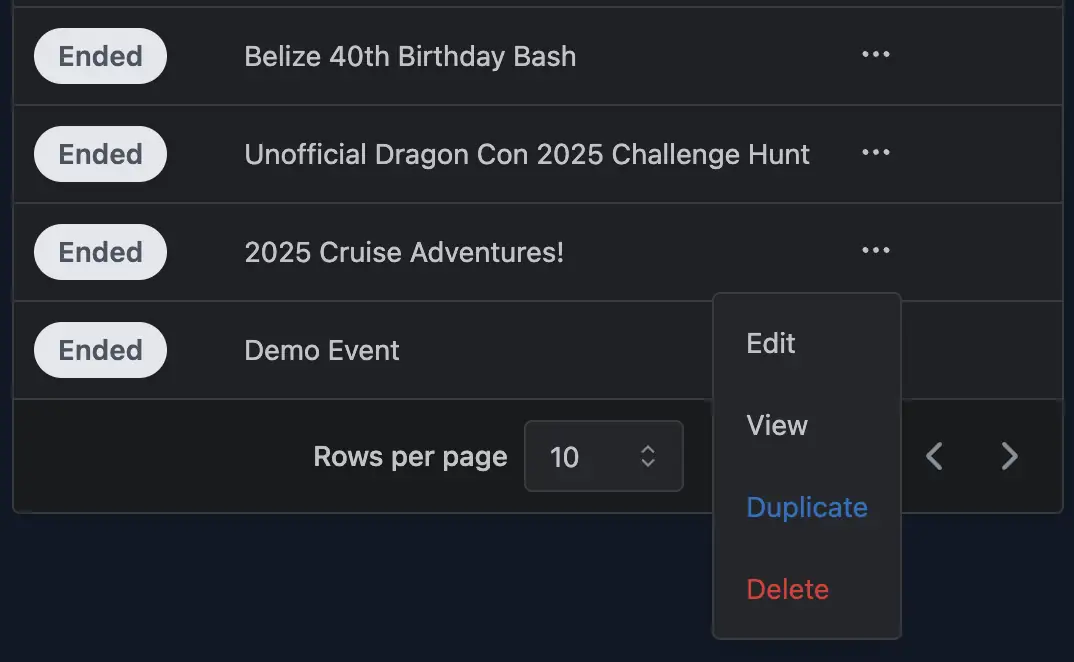
2. Choose Duplicate
In the dropdown menu, click Duplicate.
A confirmation prompt will appear to make sure you want to proceed.
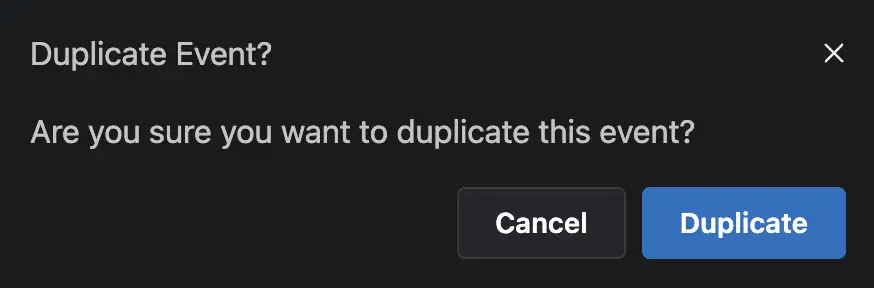
3. Confirm Duplication
In the confirmation popup, click Duplicate.
Thrillify will create a new draft event that includes:
- The Event name and settings
- All of the challenges from the original event
- Any schedules and timed challenges you previously set up
Once the copy is created, you can safely update the event’s details, adjust the schedule, or modify Event settings as needed. You can safely delete the copied Event as well without affecting the original.
Notes
- The duplicated event is created as a new draft event, so you can safely adjust event details, schedules, or Event settings without affecting the original.
- Challenges are not duplicated. Instead, they are shared across your organization’s challenge library. This means:
- If you edit a challenge in the duplicated event, the change will also apply to the original event (and any others using that challenge).
- To create a truly different version of a challenge, you’ll need to add a new challenge to your library.
- Player submissions, scores, and comments are not copied — only the structure of the event is reused.
- Duplication is especially useful for recurring events, themed events, or building from an existing template.