How do I delete a challenge submission?
Sometimes you may need to remove a challenge submission — for example, if it violates event rules, was uploaded in error, or needs to be cleared for any reason. Thrillify allows event admins to delete submissions directly from the Backstage Dashboard.
TIP
Only Event admins can delete submissions.
1. Open the Submission
From the Submissions feed in the Backstage Dashboard, locate the entry you want to remove.
Click the ••• menu on the submission.
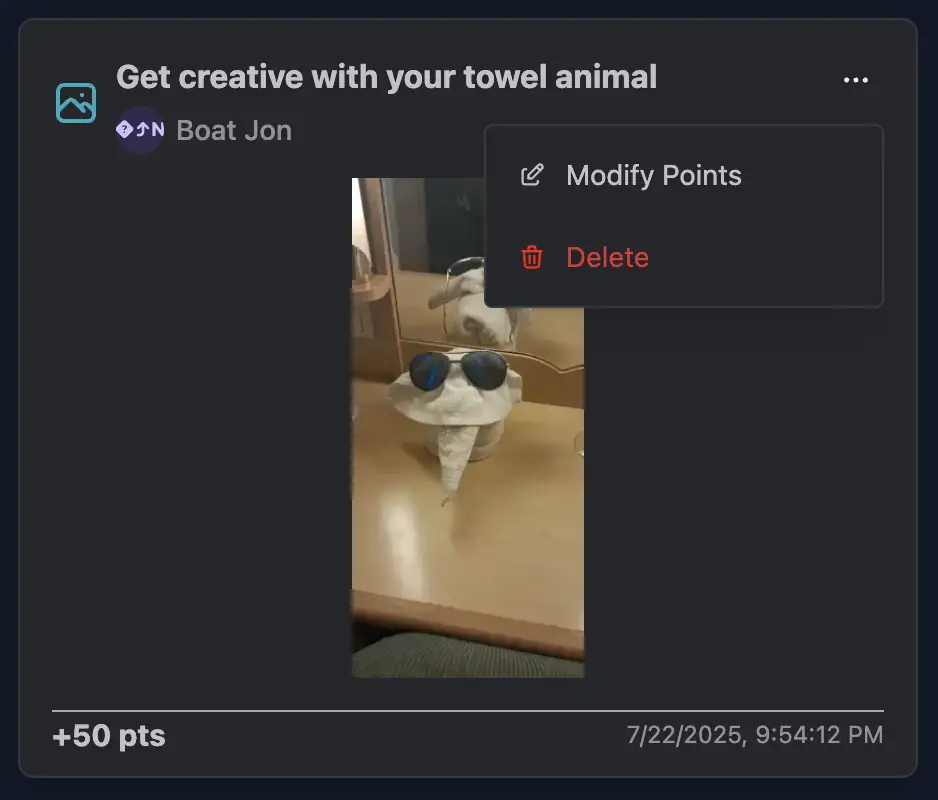
2. Select Delete
From the dropdown menu, select Delete.
You’ll be asked to confirm that you want to remove the submission.
Once confirmed, the submission will be permanently removed.
3. Impact on Scores
- Deleting a submission will also remove any points that were earned from it.
- The team’s score and leaderboard will update automatically.
- The deleted submission will no longer appear in the feed for admins or players.
Notes
- Only Event admins can delete submissions.
- Deleted submissions cannot be recovered. If you only want to change the score but keep the submission visible, consider adjusting the points instead.
- See: How do I adjust points for a challenge submission?
CAUTION
Use deletion carefully. If possible, adjust points instead of deleting so that the submission history remains visible.