

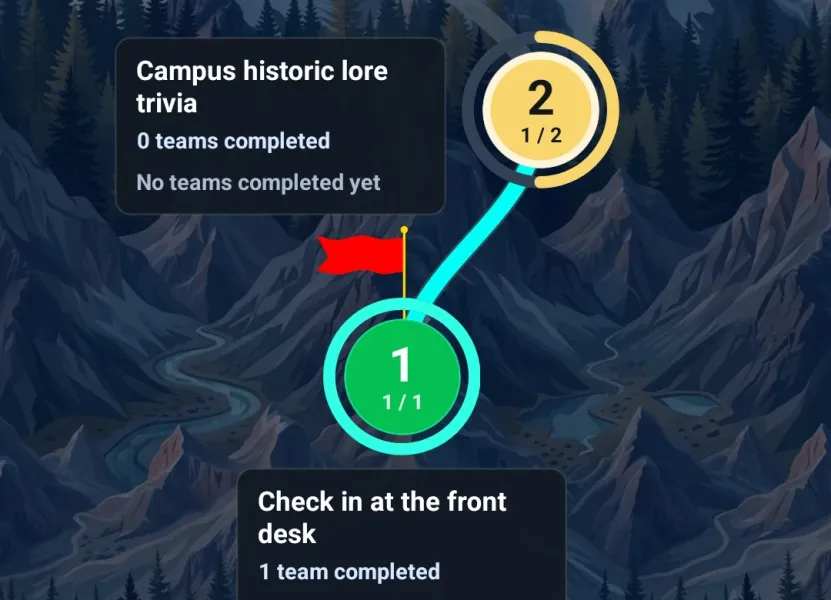
The best scavenger hunts have a sense of discovery. Teams do not just check items off a giant list; they move through the event, solve the next objective, reach a new location, and unlock the next piece of the adventure.
That is exactly what Quests bring to Thrillify. You can now build tiered, unlockable challenge paths for scavenger hunts, team-building events, conferences, conventions, parties, tours, and any live event where the order of discovery matters.
Instead of showing every challenge at once, quests let organizers group challenges into levels. Teams complete enough challenges in the current level to reveal the next set, keeping the experience focused, paced, and easier to follow.
What Are Quests?
A quest is a multi-level objective inside a Thrillify event. Each quest contains one or more levels, and each level contains one or more challenges.
For every level, you decide:
- Which challenges belong in that level
- How many of those challenges a team must complete to advance
- Whether the level has a name or description to guide players
- Whether the quest is available immediately, disabled until you manually release it, or scheduled to unlock at a specific time
That flexibility makes quests useful for both simple scavenger hunts and more structured event games. A casual party hunt might use a three-level quest with photo dares and trivia. A conference scavenger hunt might use separate quests for sponsor booths, breakout sessions, and networking goals. A city-wide hunt might use GPS challenges to unlock the next neighborhood, landmark, or clue path.
Why Tiered Unlockable Challenges Make Scavenger Hunts Better
Traditional scavenger hunt lists can get overwhelming fast, especially when you have dozens of photo challenges, clue stops, trivia questions, bonus missions, and location-based tasks. Players open the event, see everything at once, and have to decide where to start.
Tiered unlockable challenges give your scavenger hunt more shape.
Teams stay focused. Instead of scrolling through every challenge in the event, players see the quest level they are working on now. That makes it easier to understand the next objective and act quickly.
Your hunt has a natural path. You can guide teams through a route, venue, campus, expo hall, neighborhood, or party itinerary without needing to manually explain every next step.
Challenge reveals feel rewarding. Unlocking the next level creates a small moment of progress. Players get the satisfaction of finishing a stage and immediately seeing what comes next.
The event stays competitive longer. Quests create smaller races inside the larger leaderboard. A team can be first to finish a level or complete a quest even if they are not currently leading the whole event.
Late joiners are less lost. When your scavenger hunt is organized into levels, new players can orient themselves around the current quest instead of digging through a long list of unrelated activities.
Design Scavenger Hunts Around Destinations, Clues, and Checkpoints
Quests work especially well when the next activity depends on arriving somewhere. Start several quests with a destination challenge, then unlock different sets of challenges when a team gets there. The same structure also works for sessions, checkpoints, and themed activities.
For example, a checkpoint-based scavenger hunt might look like this:
- Find the starting landmark. Teams complete a GPS or photo challenge to prove they reached the first stop.
- Unlock the clue round. Once they arrive, the next level reveals trivia, photo prompts, or observation challenges tied to that location.
- Choose a path forward. The level might include five possible challenges but require only three, so teams can strategize instead of getting stuck.
- Reveal the next destination. Completing enough challenges unlocks the next level and points teams toward the next stop.
This creates a scavenger hunt that feels guided without becoming rigid. Teams still make choices, but the event designer controls the flow.
Scavenger Hunt Ideas for Quests
Quests are flexible enough to support many different scavenger hunt formats:
- Corporate team-building scavenger hunts: Send teams through office landmarks, department intros, culture trivia, and collaborative photo challenges.
- Conference and convention scavenger hunts: Create sponsor quests, expo hall passport challenges, panel check-ins, and networking missions that unlock as attendees move through the venue.
- Campus and orientation scavenger hunts: Guide students or new hires through key locations, resource stops, icebreakers, and trivia about the organization.
- City, tourism, and destination hunts: Use GPS challenges, local trivia, photo missions, and hidden gems to turn a neighborhood or tour route into an interactive scavenger hunt app experience.
- Bachelor, bachelorette, and party hunts: Build tiered dares, bar crawl missions, group selfies, and bonus rounds that reveal as the night unfolds.
- Fan events and conventions: Unlock cosplay prompts, booth visits, lore trivia, and themed mini-quests across a large venue.
Because quests can mix challenge types, the same scavenger hunt can include photos, videos, GPS check-ins, trivia, surveys, and custom text answers. That variety helps the event feel less like a static checklist and more like a live game.
Use Completion Requirements to Control Difficulty
Each quest level can include more challenges than a team is required to complete. That small detail opens up a lot of design space.
If a level has six challenges and requires three, teams can pick the route, difficulty, or style that fits them best. Competitive teams might choose the fastest path. Creative teams might chase the highest-effort photo or video prompts. New players can avoid a challenge that feels awkward or impractical without getting blocked.
If you want a stricter scavenger hunt path, set the requirement to every challenge in the level. That works well for clue chains, ordered checkpoints, required safety briefings, or sponsor obligations where the team really does need to complete everything before moving on.
Combine Quests with Scheduled Unlocks
Quests can be visible right away, kept disabled while you are preparing them, or scheduled to unlock at a specific time. Scheduled quest unlocks are especially useful for multi-phase scavenger hunts.
You might schedule:
- A morning orientation quest
- A lunch break photo quest
- An afternoon expo hall scavenger hunt
- A final bonus quest before awards
When a scheduled quest unlocks, teams can start its first level and progress at their own pace. The quest stays available after it unlocks, so you can use scheduling to pace the event without forcing every team into the exact same minute-by-minute rhythm.
How to Create a Quest in Thrillify
Create quests from the Quests tab in Thrillify Backstage. Add levels in order, choose the challenges for each level, and set how many challenges each team must complete before the next level unlocks.
From there, decide how the quest should appear to players:
- Make it visible immediately for open-ended scavenger hunts
- Keep it disabled if you want to manually reveal it later
- Schedule a Quest Unlock if it should appear at a specific time
Players will see available quests in the Quests tab of the Thrillify app. As their team completes levels, new quest challenges become available and progress updates automatically.
Build a Scavenger Hunt That Unfolds
Quests are available now in Thrillify. They are built for organizers who want more than a flat challenge list: more pacing, more discovery, more structure, and more reasons for teams to keep moving.
If you are planning an interactive scavenger hunt, a team-building challenge, an expo hall passport, a city adventure, or a multi-stage party game, quests give you a practical way to design the experience around progression.
Learn more in our support guides: