
How do I add a new challenge during the event?
Adding New Challenges During an Event
Event admins can add new challenges at any time while an Event is in progress. New challenges are created the same way as any other challenge: through the Backstage web portal.
There is no need to pause or restart the Event to add more challenges. As soon as a new challenge is published, players will be able to see it in the app.
You can also pre-add challenges before or during the Event and set them to Disabled. Disabled challenges are hidden from participants in the app. When you are ready, switch them back to Enabled to make them appear as new challenges at the moment you choose.
If you want schedule challenges to appear at specific times during your event, you can add them to your schedule as either:
- Scheduled challenge unlocks (reveal at a specific time, then stay available)
- Timed challenges (only available and completable during a specific time window)
For more info, see Create a schedule with timed challenges and unlocks.
What Players See
When a new challenge is added:
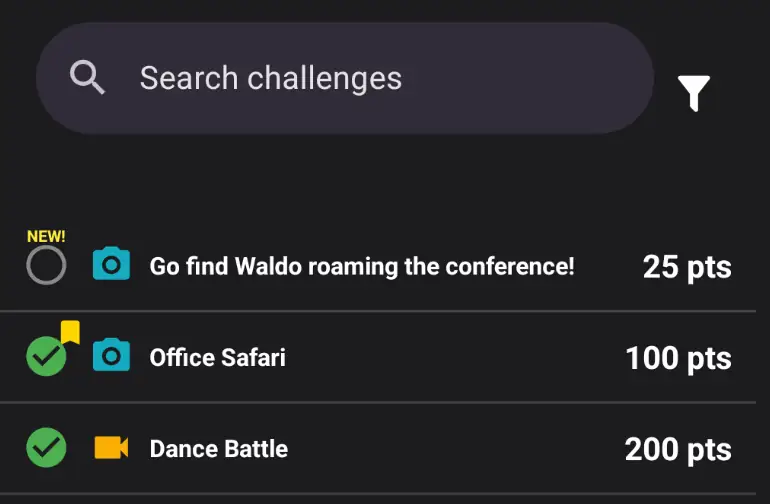
- It appears at the top of the challenge list if it was created within the past 24 hours
- A NEW! label highlights it so players can easily spot it
- Players can start working on it immediately, as long as the challenge does not have time or access restrictions
Why Add Challenges Mid-Event?
Adding challenges during the Event can:
- Keep players engaged with fresh content
- Respond to what is happening in real time
- Introduce surprise opportunities for points
- Make the Event feel more dynamic and interactive
It can be a fun way to keep energy high and adapt to the flow of the Event as it unfolds.